
Microsoft Secure Score tells you how many of Microsoft’s recommended security actions your organisation has taken. It does not tell you the probability of a breach, and a high score is not a guarantee that your business is safe.[8] Use it as a starting point for an improvement plan, rather than a pass mark.
For a small business, the useful conversation is about what still needs fixing. If your IT report contains a percentage but no explanation of the gaps, ask for the recommendations behind it.
Where to find your score
Microsoft Secure Score sits in the Microsoft Defender portal, at security.microsoft.com/securescore. The overview includes your score, its history and recommended actions across areas such as identities, devices, apps and data.[8][9]
Ask your IT provider to walk through that page with you. You do not need to make yourself a global administrator just to join the discussion. Microsoft supports read-only access and recommends using roles with the fewest permissions needed.[8]
There is no useful pass mark without context
Microsoft says the recommendations do not cover every attack surface associated with each product.[8] Our advice is to avoid turning a percentage into a blanket statement that the business is secure.
Instead, ask which unfinished actions affect the systems you depend on. An account used to administer your tenant deserves different attention from a low-impact setting that happens to offer easy points. Ask your provider to explain that distinction in plain English.
For your next review, request:
- The unresolved recommendations that matter most to your business.
- The users and devices affected by each gap.
- A named person responsible for each agreed change, with a target date.
- Evidence for anything described as already covered by another product.
Treat that as a working list. A graph on its own is not enough to decide what to do next.
Read the details before changing settings
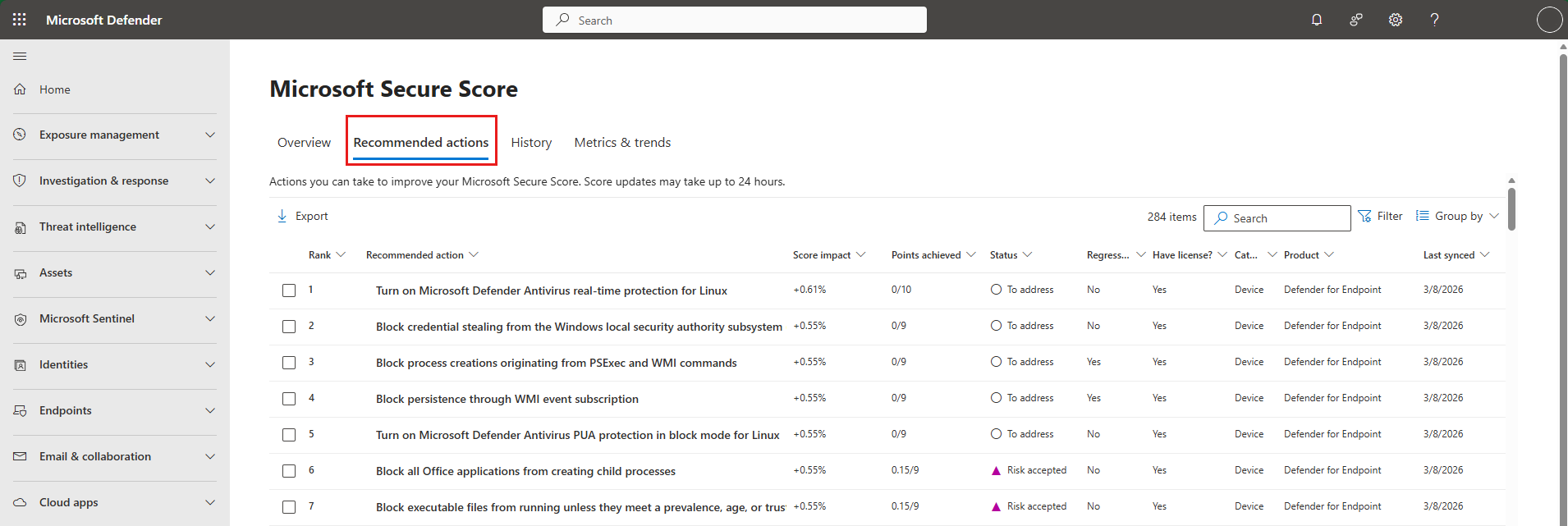
The Recommended actions tab lets you inspect individual recommendations. Microsoft’s ranking considers remaining points, implementation difficulty, user impact and complexity.[9] That makes it a useful starting order, but we recommend checking business impact before following it blindly.
Open the recommendation and read its implementation requirements. Microsoft includes licensing prerequisites and information about the users affected.[9] Check those details before buying a subscription upgrade or changing a policy across the whole organisation.
For example, if a proposed change could affect how staff sign in, plan a small pilot. Tell the people involved what to expect, test the business apps they use and agree how to reverse the change if something breaks. Record the outcome before expanding it.
Check what “resolved” means
Secure Score supports statuses including planned, risk accepted, resolved through a third party and resolved through an alternate mitigation.[9] Those labels need an explanation in your IT report.
Microsoft awards points for actions marked as resolved through another product or mitigation, but says it cannot see how completely those controls have been implemented.[9] Ask for evidence that the alternative control exists, covers the intended people or devices and is still working. A product name is not evidence of coverage.
Risk accepted is different: Microsoft does not award points for that status.[9] Our recommendation is to record why the business accepted the risk, who agreed to it and when the decision will be reviewed. Avoid leaving an exception in place simply because nobody remembers why it was created.
Do not buy licences just to improve the percentage
Microsoft can show the full set of recommendations for a supported product regardless of licence edition or plan.[8] The implementation details identify any licences needed for a particular action.[9]
Before upgrading, ask what the proposed feature would protect, whether your existing tools already provide that control, and who will configure and maintain it. Compare the cost with the business risk being addressed. We would rather see a smaller set of well-maintained controls than an expensive subscription with features nobody has configured.
After an agreed change, verify the setting itself and then check the score again. Microsoft says completed actions can take 24 to 48 hours to appear in Secure Score.[9] Do not keep changing a working policy because the number has not moved yet.
What to ask BMT to review
Bring your current score and the unfinished recommendations to BMT. Ask for a Microsoft 365 review that turns the list into a practical plan: what needs attention first, what can wait, which changes need testing and where extra licensing would genuinely help.
We recommend keeping backup recovery checks and incident response arrangements on the agenda too. Secure Score should be one part of that conversation, not the whole report.
Sources
[8] Microsoft Secure Score, Microsoft Learn: https://learn.microsoft.com/en-us/defender-xdr/microsoft-secure-score
[9] Assess your security posture with Microsoft Secure Score, Microsoft Learn: https://learn.microsoft.com/en-us/defender-xdr/microsoft-secure-score-improvement-actions
Featured image: Microsoft Learn documentation screenshot, not a BMT customer tenant.