
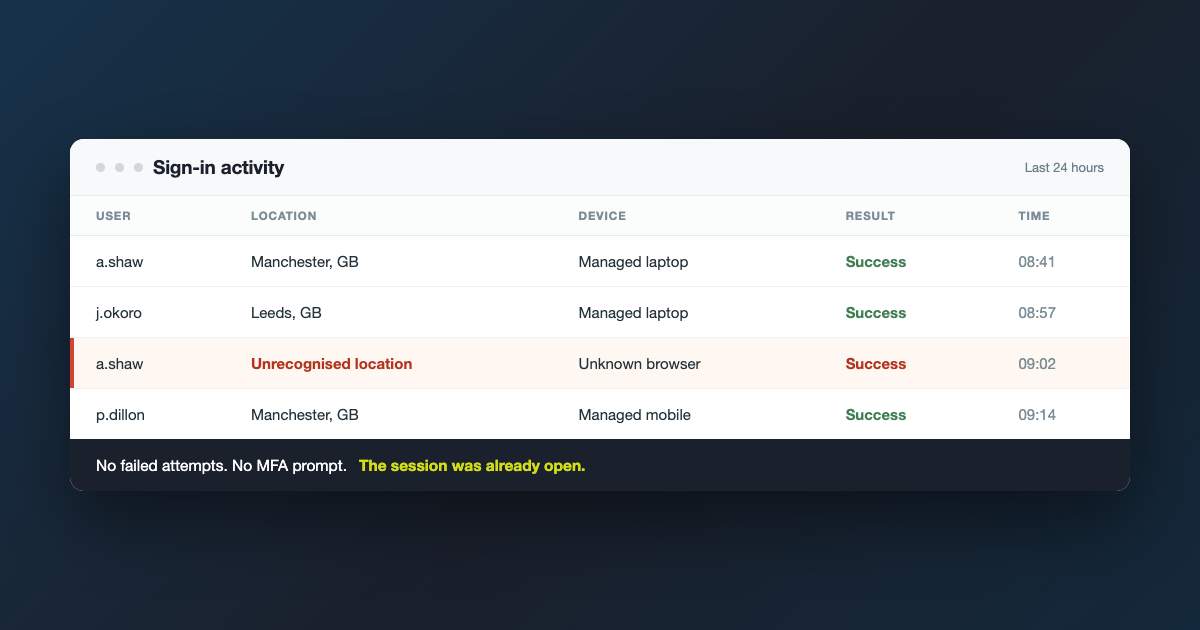
Every so often we get a call that starts the same way. Someone has been reading emails they should not have been reading, and the business is certain it cannot have happened, because multi-factor authentication is switched on and nobody approved a prompt.
Both things are usually true at once. MFA was on, nobody approved anything, and the account was still used by someone else. The reason is that the attacker never needed to log in at all.
What actually gets stolen
When you sign in to Microsoft 365 and complete MFA, you are not asked to prove who you are again for every message you open. Your browser is handed a session token, stored as a cookie, and that token is what keeps you signed in for the rest of the day.
That token is the thing worth stealing. It is proof that somebody already passed the sign-in checks. Copy it into another browser and that browser is signed in as you, with no password and no MFA prompt, because as far as Microsoft is concerned the hard part already happened. [1]
How the token ends up in somebody else’s browser
Usually through a piece of malware whose only job is to empty a browser. Families such as Lumma, RedLine and Vidar are built to read the local database where cookies and saved passwords are kept, bundle everything into a single file, and send it out within minutes of landing.
The infection often is not on a work machine at all. It is a home laptop, a family PC, or a personal phone that somebody signed into their work email on once. Those devices sit outside whatever protection you pay for, and the session they are holding is just as valid as the one on the managed laptop.
What is collected then gets sold. Access to a working mailbox is a product, and the people who steal it are rarely the same people who eventually use it, which is why the gap between the theft and anything visible happening can be weeks.
Why MFA does not stop it
MFA is an authentication control. It makes it hard to start a session without the second factor, and it is still one of the most effective things a small business can turn on. It says nothing about what happens to a session that already exists.
This is worth being clear about, because it is not a reason to be casual about MFA. A business with MFA and this problem is in a far better position than one with neither. It is a reason to stop treating MFA as the finish line.
What it looks like when it happens
Stolen sessions rarely look like an attack. There are no failed sign-ins to spot, because nobody failed. The signs are quieter.
- A successful sign-in from a country nobody has visited, with no failed attempts before it
- A new inbox rule that moves messages from your accountant or a supplier straight into a folder nobody opens
- Mail forwarding set to an outside address
- An unfamiliar app granted access to the mailbox
- Colleagues replying to a conversation your team never sent, usually about an invoice or bank details
The inbox rule is the tell. It exists so the real owner never sees the replies.
What to do about it
None of this needs a bigger budget so much as a few decisions.
Decide which devices are allowed to reach your business data, and mean it. If a device is not managed and not protected, it should not be holding a session for your email. That single rule removes most of the exposure, because most infections are on machines nobody is looking after. [4]
Move to sign-in methods that are harder to replay, such as passkeys or Windows Hello. Put conditional access in place so a session from an unknown device or an unexpected location is challenged again rather than trusted, and look at token protection, which binds a session to the device it was issued to. [2] Make sure something is actually watching Microsoft 365 sign-in activity, rather than assuming somebody would notice.
If you think it has already happened
The order matters, and it is the part most people get the wrong way round. Revoke the account’s sessions first, then reset the password. A password reset on its own does not end a session that is already running, so an attacker holding a live token keeps their access and now knows you are on to them. [3]
Once the sessions are gone, check what was left behind: inbox rules, forwarding, app permissions and anything sent from the account while it was open. Then work out which device was infected, because until that is dealt with the next session will be stolen too.
Worth checking now
If you are not sure whether anyone would spot a sign-in from abroad on your systems this afternoon, that is the honest place to start. It is a short conversation and usually a quick thing to fix.
Sources
[1] Token theft playbook, Microsoft Learn: https://learn.microsoft.com/en-us/security/operations/token-theft-playbook
[2] Token protection in Conditional Access, Microsoft Learn: https://learn.microsoft.com/en-us/entra/identity/conditional-access/concept-token-protection
[3] Revoke user access in Microsoft Entra ID, Microsoft Learn: https://learn.microsoft.com/en-us/entra/identity/users/users-revoke-access
[4] Device security guidance, National Cyber Security Centre: https://www.ncsc.gov.uk/collection/device-security-guidance
Featured image: illustration built for this article. The names, locations and times shown are invented, not a BMT customer tenant.